Fernando
Master Lead and Feedback Capture: Build Embeddable Forms with Java Spring Boot Thymeleaf
Published 1 year ago
• 15 min read
Introduction
Unlock the full potential of your lead and feedback capture strategy with this comprehensive tutorial. We'll show you how to create dynamic, embeddable forms using Java Spring Boot and Thymeleaf. These forms are designed to be seamlessly integrated into any website via iFrame, making it easier than ever to gather user data. Your collected data will be securely stored in a SQL database, and you’ll have the flexibility to forward this data to a CRM for advanced management. Dive into the step-by-step process of setting up Spring Boot and Thymeleaf to craft and style your forms, learn the best practices for embedding them through iFrame, and ensure your data is both accessible and secure. By the end of this tutorial, you'll have a versatile, high-performance system to capture and manage leads and feedback, empowering your marketing and customer engagement efforts.
Project Setup
Creating the Application with IntelliJ IDEA Ultimate
- Open IntelliJ IDEA.
- Select "New Project".
- Choose "Spring Initializr" and click "Next".
- Fill in the project metadata:
- Group:
com.your-domain - Artifact:
lead-form
- Select dependencies: Spring Web, Thymeleaf, Spring Data JPA, H2 Database, Lombok, and Spring Boot DevTools.
- Click "Finish" to create the project.
Alternative: Using Spring Initializr
You can also create the project using the Spring Initializr:
- Fill in the project metadata:
- Group:
com.pullstackdeveloper - Artifact:
lead-form
- Select dependencies: Spring Web, Thymeleaf, Spring Data JPA, H2 Database, Lombok, and Spring Boot DevTools.
- Generate the project and import it into your IDE.
Configuration
application.properties
Here we configure the in-memory H2 database and set up Thymeleaf properties.
spring.application.name=lead-form
spring.datasource.url=jdbc:h2:mem:testdb
spring.datasource.driverClassName=org.h2.Driver
spring.datasource.username=sa
spring.datasource.password=password
spring.h2.console.enabled=true
spring.jpa.database-platform=org.hibernate.dialect.H2Dialect

spring.thymeleaf.prefix=classpath:/templates/
spring.thymeleaf.suffix=.html
spring.thymeleaf.cache=false
build.gradle
This file includes the necessary dependencies and configurations for our project.
plugins {
    id 'java'
    id 'war'
    id 'org.springframework.boot' version '3.3.1'
    id 'io.spring.dependency-management' version '1.1.5'
}

group = 'com.pullstackdeveloper'
version = '0.0.1-SNAPSHOT'

java {
    toolchain {
        languageVersion = JavaLanguageVersion.of(22)
    }
}

configurations {
    compileOnly {
        extendsFrom annotationProcessor
    }
}

repositories {
    mavenCentral()
}

dependencies {
    implementation 'org.springframework.boot:spring-boot-starter-data-jpa'
    implementation 'org.springframework.boot:spring-boot-starter-thymeleaf'
    implementation 'org.springframework.boot:spring-boot-starter-web'
    compileOnly 'org.projectlombok:lombok'
    developmentOnly 'org.springframework.boot:spring-boot-devtools'
    runtimeOnly 'com.h2database:h2'
    annotationProcessor 'org.projectlombok:lombok'
    providedRuntime 'org.springframework.boot:spring-boot-starter-tomcat'
    testImplementation 'org.springframework.boot:spring-boot-starter-test'
    testRuntimeOnly 'org.junit.platform:junit-platform-launcher'
    implementation 'org.webjars:bootstrap:5.2.0'
    implementation 'jakarta.validation:jakarta.validation-api:3.0.2'
    implementation 'org.hibernate.validator:hibernate-validator:7.0.1.Final'
}

tasks.named('test') {
    useJUnitPlatform()
}
Defining the Entities
Feedback Entity
The Feedback entity will store feedback details in the database.
package com.pullstackdeveloper.leadform.model;

import jakarta.persistence.Entity;
import jakarta.persistence.GeneratedValue;
import jakarta.persistence.GenerationType;
import jakarta.persistence.Id;
import lombok.Data;

@Entity
@Data
public class Feedback {
    @Id
 @GeneratedValue(strategy = GenerationType.IDENTITY)
    private Long id;
    private String name;
    private String email;
    private Integer rating;
    private String comments;
}
Lead Entity
The Lead entity will store lead details in the database.
package com.pullstackdeveloper.leadform.model;

import jakarta.persistence.Entity;
import jakarta.persistence.GeneratedValue;
import jakarta.persistence.GenerationType;
import jakarta.persistence.Id;
import lombok.Data;

@Entity
@Data
public class Lead {
    @Id
 @GeneratedValue(strategy = GenerationType.IDENTITY)
    private Long id;
    private String name;
    private String email;
}
Defining the DTOs
FeedbackDTO
This Data Transfer Object (DTO) will be used to transfer feedback data between the client and server.
package com.pullstackdeveloper.leadform.dto;

import jakarta.validation.constraints.*;
import lombok.Data;

@Data
public class FeedbackDTO {
    @NotBlank(message = "Name is mandatory")
    private String name;

    @Email(message = "Email should be valid")
    @NotBlank(message = "Email is mandatory")
    private String email;

    @NotNull(message = "Rating is mandatory")
    @Min(value = 1, message = "Rating should not be less than 1")
    @Max(value = 5, message = "Rating should not be more than 5")
    private Integer rating;

    @NotBlank(message = "Comments are mandatory")
    private String comments;
}
LeadDTO
This DTO will be used to transfer lead data between the client and server.
package com.pullstackdeveloper.leadform.dto;

import jakarta.validation.constraints.Email;
import jakarta.validation.constraints.NotBlank;
import lombok.Data;

@Data
public class LeadDTO {
    @NotBlank(message = "Name is mandatory")
    private String name;

    @Email(message = "Email should be valid")
    @NotBlank(message = "Email is mandatory")
    private String email;

    @NotBlank(message = "Message is mandatory")
    private String message;
}
Repository Interfaces
FeedbackRepository
This interface will handle CRUD operations for the Feedback entity.
package com.pullstackdeveloper.leadform.repository;

import com.pullstackdeveloper.leadform.model.Feedback;
import org.springframework.data.jpa.repository.JpaRepository;

public interface FeedbackRepository extends JpaRepository<Feedback, Long> {
}
LeadRepository
This interface will handle CRUD operations for the Lead entity.
package com.pullstackdeveloper.leadform.repository;

import com.pullstackdeveloper.leadform.model.Lead;
import org.springframework.data.jpa.repository.JpaRepository;

public interface LeadRepository extends JpaRepository<Lead, Long> {
}
Service Layer
FeedbackService
This service class will manage business logic related to feedback.
package com.pullstackdeveloper.leadform.service;

import com.pullstackdeveloper.leadform.dto.FeedbackDTO;
import com.pullstackdeveloper.leadform.model.Feedback;
import com.pullstackdeveloper.leadform.repository.FeedbackRepository;
import org.springframework.beans.factory.annotation.Autowired;
import org.springframework.stereotype.Service;

@Service
public class FeedbackService {
    @Autowired
    private FeedbackRepository feedbackRepository;

    public void saveFeedback(FeedbackDTO feedbackDTO) {
        Feedback feedback = new Feedback();
        feedback.setName(feedbackDTO.getName());
        feedback.setEmail(feedbackDTO.getEmail());
        feedback.setComments(feedbackDTO.getComments());
        feedbackRepository.save(feedback);
    }
}
LeadService
This service class will manage business logic related to leads.
package com.pullstackdeveloper.leadform.service;

import com.pullstackdeveloper.leadform.dto.LeadDTO;
import com.pullstackdeveloper.leadform.model.Lead;
import com.pullstackdeveloper.leadform.repository.LeadRepository;
import org.springframework.beans.factory.annotation.Autowired;
import org.springframework.stereotype.Service;

@Service
public class LeadService {

    @Autowired
    private LeadRepository leadRepository;

    public Lead saveLead(LeadDTO leadDTO) {
        Lead lead = new Lead();
        lead.setName(leadDTO.getName());
        lead.setEmail(leadDTO.getEmail());
        return leadRepository.save(lead);
    }
}
Controller
FormsController
This controller will handle form submissions and routing for lead and feedback forms.
package com.pullstackdeveloper.leadform.controller;

import com.pullstackdeveloper.leadform.dto.FeedbackDTO;
import com.pullstackdeveloper.leadform.dto.LeadDTO;
import com.pullstackdeveloper.leadform.service.FeedbackService;
import com.pullstackdeveloper.leadform.service.LeadService;
import jakarta.validation.Valid;
import org.springframework.beans.factory.annotation.Autowired;
import org.springframework.stereotype.Controller;
import org.springframework.ui.Model;
import org.springframework.validation.BindingResult;
import org.springframework.web.bind.annotation.GetMapping;
import org.springframework.web.bind.annotation.PostMapping;
import org.springframework.web.bind.annotation.RequestMapping;
import org.springframework.web.bind.annotation.RequestParam;

@Controller
@RequestMapping("/")
public class FormsController {

    @Autowired
    private LeadService leadService;
    @Autowired
    private FeedbackService feedbackService;

    @GetMapping("/form")
    public String showForm(@RequestParam(name = "type", defaultValue = "lead") String type,
                           @Valid FeedbackDTO feedbackDTO, BindingResult feedbackResult,
                           @Valid LeadDTO leadDTO, BindingResult leadResult,
                           Model model

) {
        if ("feedback".equals(type)) {
            model.addAttribute("feedback", feedbackDTO);
            return "feedbackForm";
        } else {
            model.addAttribute("lead", leadDTO);
            return "leadForm";
        }
    }

    @PostMapping("/submit")
    public String submitForm(@RequestParam(name = "type", defaultValue = "lead") String type,
                             @Valid FeedbackDTO feedbackDTO, BindingResult feedbackResult,
                             @Valid LeadDTO leadDTO, BindingResult leadResult,
                             Model model) {
        if ("feedback".equals(type)) {
            if (feedbackResult.hasErrors()) {
                model.addAttribute("feedback", feedbackDTO);
                return "feedbackForm";
            }
            feedbackService.saveFeedback(feedbackDTO);
            model.addAttribute("message", "Feedback submitted successfully!");
            model.addAttribute("feedback", new FeedbackDTO());
            return "feedbackForm";
        } else {
            if (leadResult.hasErrors()) {
                model.addAttribute("lead", leadDTO);
                return "leadForm";
            }
            leadService.saveLead(leadDTO);
            model.addAttribute("message", "Lead submitted successfully!");
            model.addAttribute("lead", new LeadDTO());
            return "leadForm";
        }
    }
}
Resources
Static CSS
feedbackForm.css
This CSS file will style the feedback form.
html {
    background-color: #111821 !important;
}

body {
    background-color: transparent !important;
    padding: 0 !important;
}

.container {
    background-color: transparent !important;
    padding: 30px;
    border-radius: 10px;
    box-shadow: 0 0 10px rgba(0, 0, 0, 0.1);
}

.btn-primary {
    background-color: #5217d1;
    border-color: #5217d1;
}

.btn-primary:hover {
    background-color: #4915ba;
    border-color: #4915ba;
}

.form-group {
    margin: 20px;
}

.styled-input,
.styled-input select,
.styled-input textarea {
    width: 100%;
    background: transparent;
    border: none;
    border-bottom: 2px solid transparent;
    color: #b8babd;
    font-size: 1rem;
    padding: 10px 5px;
    transition: border-color 0.6s ease-in-out, box-shadow 0.9s ease-in-out;
    border-radius: 0;
    -webkit-appearance: none;
    -moz-appearance: none;
    appearance: none;
}

.styled-input:focus,
.styled-input select:focus,
.styled-input textarea:focus {
    border-color: #5217d1;
    outline: none;
    box-shadow: none;
    color: #b8babd;
}

.styled-input::placeholder,
.styled-input select::placeholder,
.styled-input textarea::placeholder {
    color: #6c757d;
    opacity: 0.7;
}

.form-label {
    color: #495057;
}

.styled-input.is-invalid,
.styled-input select.is-invalid,
.styled-input textarea.is-invalid {
    border-bottom-color: red;
}

.styled-input.is-valid,
.styled-input select.is-valid,
.styled-input textarea.is-valid {
    border-bottom-color: green;
}

.styled-input select option {
    background: transparent !important;
    color: #b8babd;
}

.logo {
    max-height: 100px;
    margin: 0 auto;
}
leadForm.css
This CSS file will style the lead form.
html {
    background-color: #111821 !important;
}

body {
    background-color: transparent !important;
    padding: 0 !important;
}

.logo {
    max-height: 100px;
    margin: 0 auto;
}

.container {
    color: #b8babd;
    background-color: transparent !important;
    padding: 30px;
    border-radius: 10px;
}

.btn-primary {
    background-color: #5217d1;
    border-color: #5217d1;
}

.btn-primary:hover {
    background-color: #4915ba;
    border-color: #4915ba;
}

.form-group {
    margin: 20px;
}

.styled-input {
    width: 40%;
    background: transparent;
    border: none;
    border-bottom: 2px solid transparent;
    color: #b8babd;
    font-size: 1rem;
    padding: 10px 5px;
    transition: border-color 0.6s ease-in-out, box-shadow 0.9s ease-in-out;
}

.styled-input:focus {
    border-color: #5217d1;
    outline: none;
    box-shadow: none;
    color: #b8babd;
}

.styled-input::placeholder {
    color: #b8babd;
    opacity: 0.7;
}

.form-label {
    color: #b8babd;
}

.form-control {
    background: transparent !important;
    border: none;
    border-bottom: 2px solid #b8babd;
    color: #b8babd;
    border-radius: 0;
    transition: border-color 0.3s ease-in-out, box-shadow 0.3s ease-in-out;
}

.form-control:focus {
    border-color: #5217d1;
    box-shadow: none;
    outline: none;
    color: #b8babd;
}

.form-control::placeholder {
    color: #b8babd;
    opacity: 0.7;
}

.form-label {
    color: #b8babd;
}

.styled-input.is-invalid {
    border-bottom-color: red;
}

.styled-input.is-valid {
    border-bottom-color: green;
}
Templates
feedbackForm.html
This Thymeleaf template will render the feedback form.
<!DOCTYPE html>
<html xmlns:th="http://www.thymeleaf.org">
<head>
    <link rel="stylesheet" th:href="@{/webjars/bootstrap/5.2.0/css/bootstrap.min.css}" />
    <link rel="stylesheet" th:href="@{/css/feedbackForm.css}" />
    <title>Feedback Form</title>
</head>
<body>
    <div class="container mt-2">
        <div class="row">
            <div class="col-12 d-flex justify-content-start mb-5">
                <img class="img-fluid logo" th:src="@{/images/logo_full.png}" alt="Logo">
            </div>
        </div>
        <form th:action="@{/submit?type=feedback}" th:object="${feedback}" method="post" class="needs-validation" novalidate>
            <div class="mb-3">
                <input type="text" th:field="*{name}" class="styled-input" placeholder="Name" id="name" required>
                <div class="invalid-feedback" th:if="${#fields.hasErrors('name')}" th:errors="*{name}">Name is required</div>
            </div>
            <div class="mb-3">
                <input type="email" th:field="*{email}" placeholder="Email" class="styled-input" id="email" required>
                <div class="invalid-feedback" th:if="${#fields.hasErrors('email')}" th:errors="*{email}">Email must be valid</div>
            </div>
            <div class="mb-3">
                <label for="rating" class="form-label">Rating</label>
                <select th:field="*{rating}" class="styled-input" id="rating" required>
                    <option value="1" th:selected="*{rating == 1}">1 star</option>
                    <option value="2" th:selected="*{rating == 2}">2 stars</option>
                    <option value="3" th:selected="*{rating == 3}">3 stars</option>
                    <option value="4" th:selected="*{rating == 4}">4 stars</option>
                    <option value="5" th:selected="*{rating == 5}">5 stars</option>
                </select>
                <div class="invalid-feedback" th:if="${#fields.hasErrors('rating')}" th:errors="*{rating}">Rating is required</div>
            </div>
            <div class="mb-3">
                <label for="comments" class="form-label">Comments</label>
                <textarea th:field="*{comments}" class="styled-input" id="comments" rows="3" required></textarea>
                <div class="invalid-feedback" th:if="${#fields.hasErrors('comments')}" th:errors="*{comments}">Comments are required</div>
            </div>
            <button type="submit" class="btn btn-primary">Submit</button>
        </form>
        <div th:if="${message}" class="alert alert-success mt-3" role="alert">
            <span th:text="${message}"></span>
        </div>
    </div>
    <script th:src="@{/webjars/bootstrap/5.2.0/js/bootstrap.bundle.min.js}"></script>
    <script>
        (function() {
            'use strict';
            window.addEventListener('load', function() {
                var forms = document.getElementsByClassName('needs-validation');
                Array.prototype.filter.call(forms, function(form) {
                    form.addEventListener('submit', function(event) {
                        if (form.checkValidity

() === false) {
                            event.preventDefault();
                            event.stopPropagation();
                        }
                        form.classList.add('was-validated');
                    }, false);
                });
                var inputs = document.querySelectorAll('.styled-input');
                inputs.forEach(function(input) {
                    input.addEventListener('focusout', function() {
                        if (input.checkValidity() === false) {
                            input.classList.add('is-invalid');
                            input.classList.remove('is-valid');
                        } else {
                            input.classList.add('is-valid');
                            input.classList.remove('is-invalid');
                        }
                    });
                    input.addEventListener('focus', function() {
                        input.classList.remove('is-invalid');
                        input.classList.remove('is-valid');
                    });
                });
            }, false);
        })();
    </script>
</body>
</html>
leadForm.html
This Thymeleaf template will render the lead form.
<!DOCTYPE html>
<html xmlns:th="http://www.thymeleaf.org">
<head>
    <link rel="stylesheet" th:href="@{/webjars/bootstrap/5.2.0/css/bootstrap.min.css}" />
    <link rel="stylesheet" th:href="@{/css/leadForm.css}" />
    <title>Lead Form</title>
</head>
<body style="background-color: transparent;">
    <div class="container mt-2">
        <div class="row">
            <div class="col p-5 d-flex justify-content-start align-items-start mb-5" style="position: relative">
                <img class="logo" th:src="@{/images/logo_full.png}" alt="Logo" style="position: absolute; left: 0; top: 30px">
            </div>
        </div>
        <div class="row">
            <div class="col">
                <form th:action="@{/submit?type=lead}" th:object="${lead}" method="post" class="needs-validation" novalidate>
                    <div class="mb-3">
                        <input type="text" th:field="*{name}" placeholder="Name" class="styled-input" id="name" required>
                        <div class="invalid-feedback" th:if="${#fields.hasErrors('name')}" th:errors="*{name}">Name is required</div>
                    </div>
                    <div class="mb-3">
                        <input type="email" th:field="*{email}" class="styled-input" placeholder="Email" id="email" required>
                        <div class="invalid-feedback" th:if="${#fields.hasErrors('email')}" th:errors="*{email}">Email must be valid</div>
                    </div>
                    <button type="submit" class="btn btn-primary">Subscribe</button>
                </form>
                <div th:if="${message}" class="alert alert-success mt-3" role="alert">
                    <span th:text="${message}"></span>
                </div>
            </div>
        </div>
    </div>
    <script th:src="@{/webjars/bootstrap/5.2.0/js/bootstrap.bundle.min.js}"></script>
    <script>
        (function() {
            'use strict';
            window.addEventListener('load', function() {
                var forms = document.getElementsByClassName('needs-validation');
                Array.prototype.filter.call(forms, function(form) {
                    form.addEventListener('submit', function(event) {
                        if (form.checkValidity() === false) {
                            event.preventDefault();
                            event.stopPropagation();
                        }
                        form.classList.add('was-validated');
                    }, false);
                });
                var inputs = document.querySelectorAll('.styled-input');
                inputs.forEach(function(input) {
                    input.addEventListener('focusout', function() {
                        if (input.checkValidity() === false) {
                            input.classList.add('is-invalid');
                            input.classList.remove('is-valid');
                        } else {
                            input.classList.add('is-valid');
                            input.classList.remove('is-invalid');
                        }
                    });
                    input.addEventListener('focus', function() {
                        input.classList.remove('is-invalid');
                        input.classList.remove('is-valid');
                    });
                });
            }, false);
        })();
    </script>
</body>
</html>
Project Structure
Here's a snapshot of the project's file structure.
|   .gitignore
|   build.gradle
|   gradlew
|   gradlew.bat
|   HELP.md
|   settings.gradle
|
+---src
|   +---main
|   |   +---java
|   |   |   \---com
|   |   |       \---pullstackdeveloper
|   |   |           \---leadform
|   |   |               |   LeadFormApplication.java
|   |   |               +---controller
|   |   |               |       FormsController.java
|   |   |               +---dto
|   |   |               |       FeedbackDTO.java
|   |   |               |       LeadDTO.java
|   |   |               +---model
|   |   |               |       Feedback.java
|   |   |               |       Lead.java
|   |   |               +---repository
|   |   |               |       FeedbackRepository.java
|   |   |               |       LeadRepository.java
|   |   |               \---service
|   |   |                       FeedbackService.java
|   |   |                       LeadService.java
|   |   \---resources
|   |       |   application.properties
|   |       +---static
|   |       |   +---css
|   |       |   |       feedbackForm.css
|   |       |   |       leadForm.css
|   |       |   +---images
|   |       |   |       example-image.jpg
|   |       |   \---js
|   |       \---templates
|   |               feedbackForm.html
|   |               leadForm.html
|   \---test
|       \---java
|           \---com
|               \---pullstackdeveloper
|                   \---leadform
|                           LeadFormApplicationTests.java
Viewing the Forms
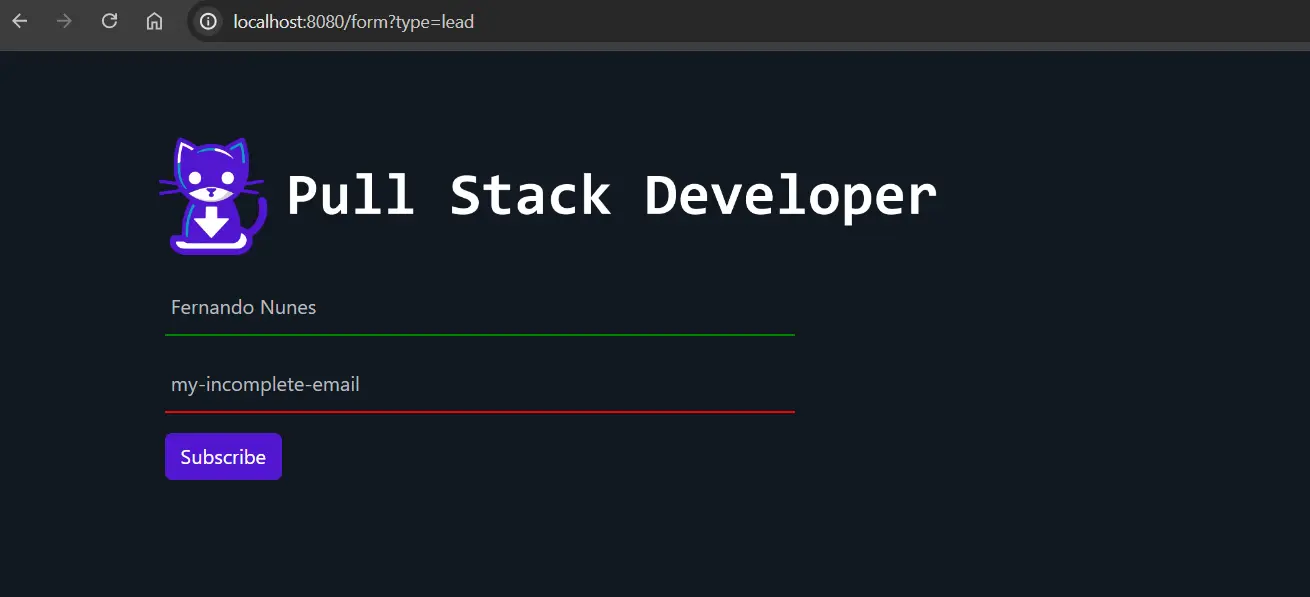
In this section, we will show you how to display the form alone in the browser and then embed it into another website using an iframe.
Viewing the Form Alone in the Browser
To view the form directly in the browser, you can simply navigate to the endpoint where the form is hosted. For example, if you want to view the lead form:
- Start your Spring Boot application.
- Open a web browser and go to
http://localhost:8080/form?type=lead.
This URL will render the lead form directly in the browser.
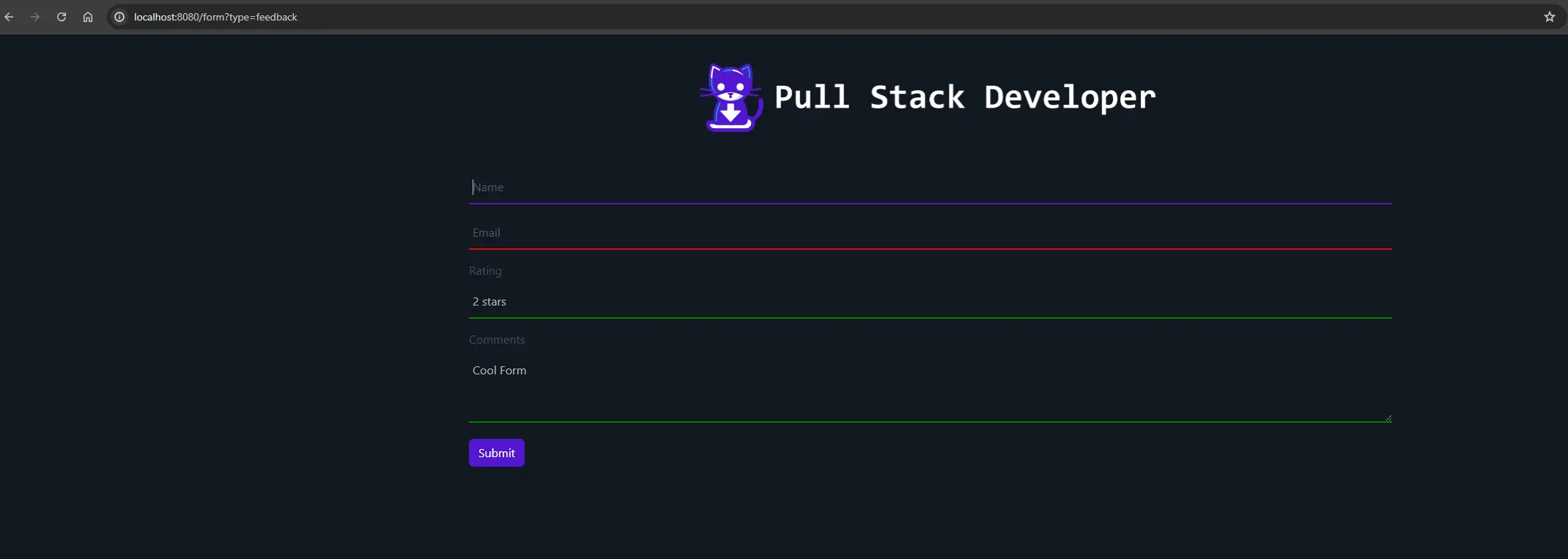
To view the feedback form, navigate to:http://localhost:8080/form?type=feedback.
Embedding the Form in Another Website
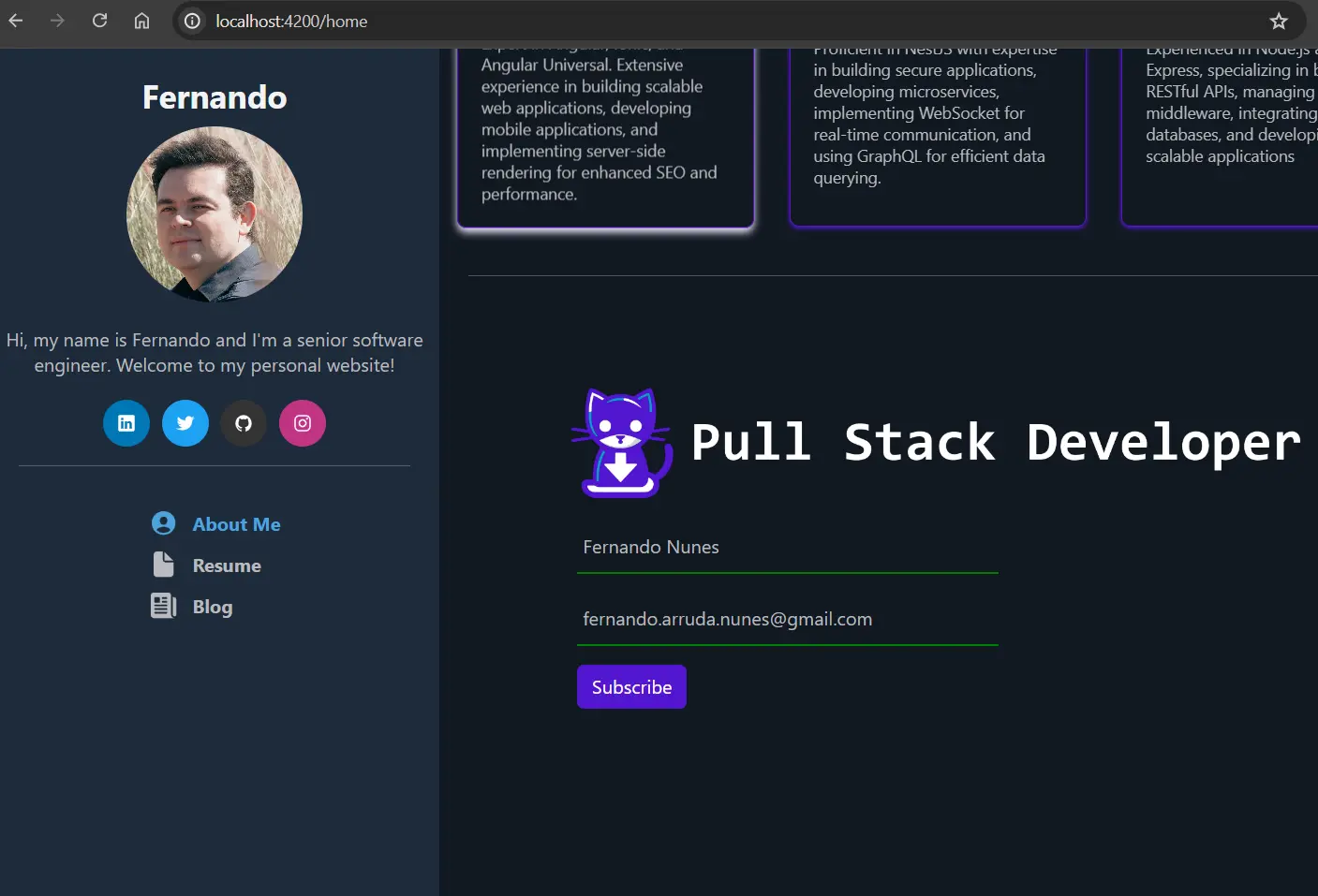
To embed the form in another website using an iframe, you need to add the following HTML snippet to the HTML file of the website where you want to embed the form.
For embedding the lead form:
<iframe src="http://localhost:8080/form?type=lead" width="100%" height="600" frameborder="0" style="border:0;"></iframe>
 For embedding the feedback form:
<iframe src="http://localhost:8080/form?type=feedback" width="100%" height="600" frameborder="0" style="border:0;"></iframe>
Example HTML for Embedding
Here's an example of a simple HTML page that embeds both the lead and feedback forms:
<!DOCTYPE html>
<html lang="en">
<head>
    <meta charset="UTF-8">
    <meta name="viewport" content="width=device-width, initial-scale=1.0">
    <title>Embedded Lead and Feedback Forms</title>
</head>
<body>
    <h1>Lead Form</h1>
    <iframe src="http://localhost:8080/form?type=lead" width="100%" height="600" frameborder="0" style="border:0;"></iframe>

    <h1>Feedback Form</h1>
    <iframe src="http://localhost:8080/form?type=feedback" width="100%" height="600" frameborder="0" style="border:0;"></iframe>
</body>
</html>
Conclusion
In this tutorial, we have walked through the creation of a powerful lead and feedback capture system using Java Spring Boot and Thymeleaf. We covered how to:
- Set up a Spring Boot project with necessary dependencies.
- Define entities and DTOs for leads and feedback.
- Create repository interfaces for database interactions.
- Implement service layers to handle business logic.
- Develop a controller to manage form submissions and routing.
- Design and style forms using Thymeleaf and CSS.
- Display the forms directly in the browser.
- Embed the forms into other websites using iframes.
By following these steps, you have built a versatile and high-performance solution for capturing and managing leads and feedback, enhancing your marketing and customer engagement efforts. The ability to embed forms via iframes provides flexibility and ease of integration across different platforms, making it easier to gather user data efficiently. You also have the option to forward captured data to a CRM for advanced management, further optimizing your business processes.
Feel free to expand this project by adding more features, such as additional form fields, email notifications, or integration with other services. With this foundation, you are well-equipped to create robust data capture solutions tailored to your specific needs. Happy coding!
Get the Working Code
Want to see the code from this tutorial in action? PULL the complete working example from my GitHub repository!

© 2024 PullStackDeveloper. All rights reserved.